
How Is Your Business Data Protected While AI Uses It?
November 4, 2026 · By Torch Ignited Academy
Imagine asking an AI assistant to compare several confidential proposals. It could help you organize the differences, identify missing details, and prepare questions for each vendor. Before uploading those documents, though, there is another question worth asking: how will their contents be protected while the AI works with them?
A reassuring phrase such as “your data is encrypted” is a starting point. To understand what it means for your particular task, you need to know which information is protected, at what stage, and from whom.
An October 23 announcement from IBM puts one part of that conversation in focus: protecting sensitive information during processing. The technology involved is called confidential computing. Understanding the basic idea can help you ask better questions about the AI services your business uses.
What IBM and Intel announced
IBM described its collaboration with Intel to bring confidential computing capabilities to environments built around IBM Sovereign Core. IBM’s software provides operational control and governance, while Intel Trust Domain Extensions, or TDX, adds hardware-based isolation for supported workloads.
The intended benefit is to reduce exposure of sensitive information to privileged infrastructure access while work is running. The announcement also discusses ways to verify aspects of the computing environment.
This is an enterprise infrastructure announcement. It does not establish that these protections have appeared in your existing AI subscription, and it does not give a general release date or price for the combined offering. Availability and coverage would need to be confirmed for a specific deployment.
Three stages of handling your data
To understand the announcement, it helps to separate three situations that often get grouped together under “data security.”
- Data at rest - Information stored somewhere, such as a saved document or database record.
- Data in transit - Information moving between systems, such as a file being uploaded from your device to a service.
- Data in use - Information being processed, such as the contents of a document being analyzed by an application.
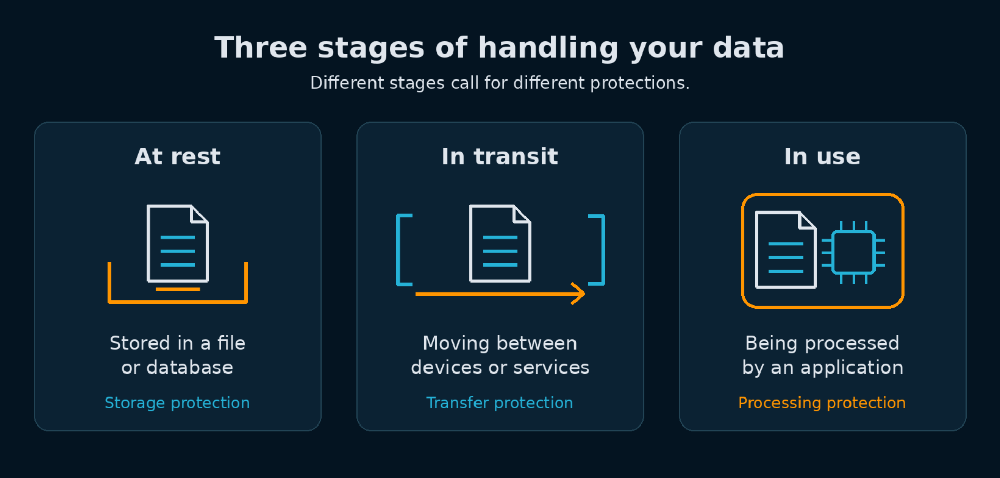
Encryption can protect stored information and network traffic. Processing introduces a different challenge because applications generally need access to readable information to perform their work. Confidential computing addresses this stage through a protected computing environment enforced by hardware.
Think of the difference between locking a document in a cabinet, transporting it in a secure container, and controlling who can enter the room where it is being reviewed. Each protection addresses a different part of the process.
What confidential computing changes
Intel describes TDX as a way to protect virtual machines—software-based computers—from unauthorized access by the surrounding system software. Its hardware-enforced boundaries and memory protections are designed to keep the host system from inspecting the protected machine’s contents.
For a business evaluating a provider, that introduces a useful distinction: operating the underlying infrastructure does not necessarily have to grant ordinary access to the protected information being processed inside it.
Another term you may encounter is attestation. This provides technical evidence about the environment, such as whether particular protections are enabled and what initial software state is present. It helps a system check the environment before trusting it with sensitive work.
That evidence has a defined scope. As Canonical explains in its confidential computing guidance, an initial check does not automatically establish the safety of every application loaded later or every action it performs. The software inside the protected environment still matters.
Keep these separate questions separate
When evaluating an AI service, consider asking about processing protection alongside several other subjects: retention, model training, employee access, connected applications, and the handling of generated results.
For example, “Do you use our documents to train models?” asks about an allowed use of the information. “Who can access the information during processing?” asks about access and technical protection. A useful answer to one should not be treated as the answer to the other.
Similarly, ask separately who can open the completed report, how long uploaded files remain available, and what happens when someone connects another application. Request answers for the actual product, plan, and configuration you intend to use.
Our recommendation is to treat these as individual review items. Doing so makes it easier to see which questions have been answered and which still need a decision from your team.
Five questions to ask your AI provider
You do not need to begin with processor specifications. Start with a clear description of your intended task and the information involved. Then use these questions to guide the conversation.
1. Which information will this workflow handle?
List what you plan to submit: public product descriptions, internal meeting notes, customer records, or confidential proposals, for example. Ask whether the proposed service is appropriate for those categories. Include any connected applications in the discussion so the review covers more than the files you manually upload.
2. What protects that information during processing?
Ask the provider to explain its controls in plain language and provide supporting documentation. If it offers confidential computing, ask exactly which parts of your workflow use it. Request an explanation of what remains outside the protected environment, rather than accepting a broad product label as the complete answer.
3. Who can access the information and results?
Ask about your own users, administrators, provider personnel, and connected services. Describe a specific situation: “An employee uploads a confidential proposal and creates a summary. Who can retrieve the original and the summary?” A concrete example can make an otherwise abstract answer much easier to evaluate.
4. What evidence can we review?
Request documentation relevant to your intended service and configuration. Have your IT or security partner help interpret technical reports and identify their limits. Keep track of what each document actually establishes, the period it covers, and any responsibilities assigned to your organization.
5. What would we need to change to use it?
Ask about availability, supported configurations, implementation work, cost, and ongoing administration. Before evaluating a new platform, write down the problem you want it to solve. That gives your team a practical way to judge whether additional protection addresses a real requirement for this particular task.
A manageable next step for this week
Choose one AI workflow your team already uses or wants to try. Write a short description of the task, the information required, the people who need the result, and the person responsible for approving the workflow.
For the proposal-comparison example, you might record that the goal is to identify differences between offers. Then decide whether an initial test could use fictional proposals with the same structure. This gives you a way to assess the usefulness of the output while questions about handling the real documents are being resolved.
Send that description to your IT partner or provider with the five questions above. Ask for answers tied to the service you actually have. Record unresolved points and assign someone to follow up.
You can begin that conversation without becoming a security specialist. A clear task, a defined set of information, and specific questions give you a useful foundation for deciding how AI should fit into your business.
Sources
- Protecting AI at Runtime with IBM and Intel — IBM, October 23, 2026. This week's announcement.
- What Is Confidential Computing? — IBM. Background explanation.
- What Is Intel Trust Domain Extensions (Intel TDX)? — Intel, last reviewed June 1, 2026. Background documentation.
- Confidential Computing in the Real World: Finding Your Use Case — Canonical, October 2, 2026. Background explanation and limitations.
- Visuals: original AI-generated conceptual illustration and custom explanatory diagram prepared for this article. Neither depicts an IBM or Intel product.
What's New in Torch Ignited Academy
New course: Practical AI - You Don't Need the Perfect Prompt
Explore iterative prompting with instructor Robert Baumgarten, shown through a real, in-chat demonstration.